Laboperator's Workflow Editor
March 2025 / My role was Senior Product Designer
The Workflow Editor is a lab procedure workflow builder for scientists. Create your workflow in the Workflow Editor. Run and scale it in Laboperator.
Context and Problem
Laboperator is a Lab Execution System (LES) where users run lab procedures (workflows).
Workflows must be created by writing and uploading JSON, which is slow and inaccessible for most users.
This creates a major bottleneck that limits who can build, update, or scale workflows.
Hypothesis
If we remove the need to write JSON and allow users to visually create workflows, we will eliminate a key adoption bottleneck and increase customer acquisition for Laboperator.
Evidence to support hypothesis
Only 5–10% of workflows were created by customers, typically by 1–2 technical users per organization; the majority were created by our internal team.
100% of new customers required onboarding support to set up their first workflow.
Around 40–60% of potential customers were lost during sales due to the workflow creation bottleneck.
What does success look like?
Eliminate the base requirement of having to write code in order to create workflows.
Close customer acquisitions gap for key prospects.
Starting point
Understanding how scientists design lab protocols
We conducted 16 interviews across small labs to large-scale research organizations, focusing on users who create and manage protocols.
Senior level scientists or technicians who already create their teams protocols are our target user base.
After consolidating all of our interviewees' protocol design processes and contextual insights, I mapped them to a larger user journey to uncover challenges and define requirements and KPI's
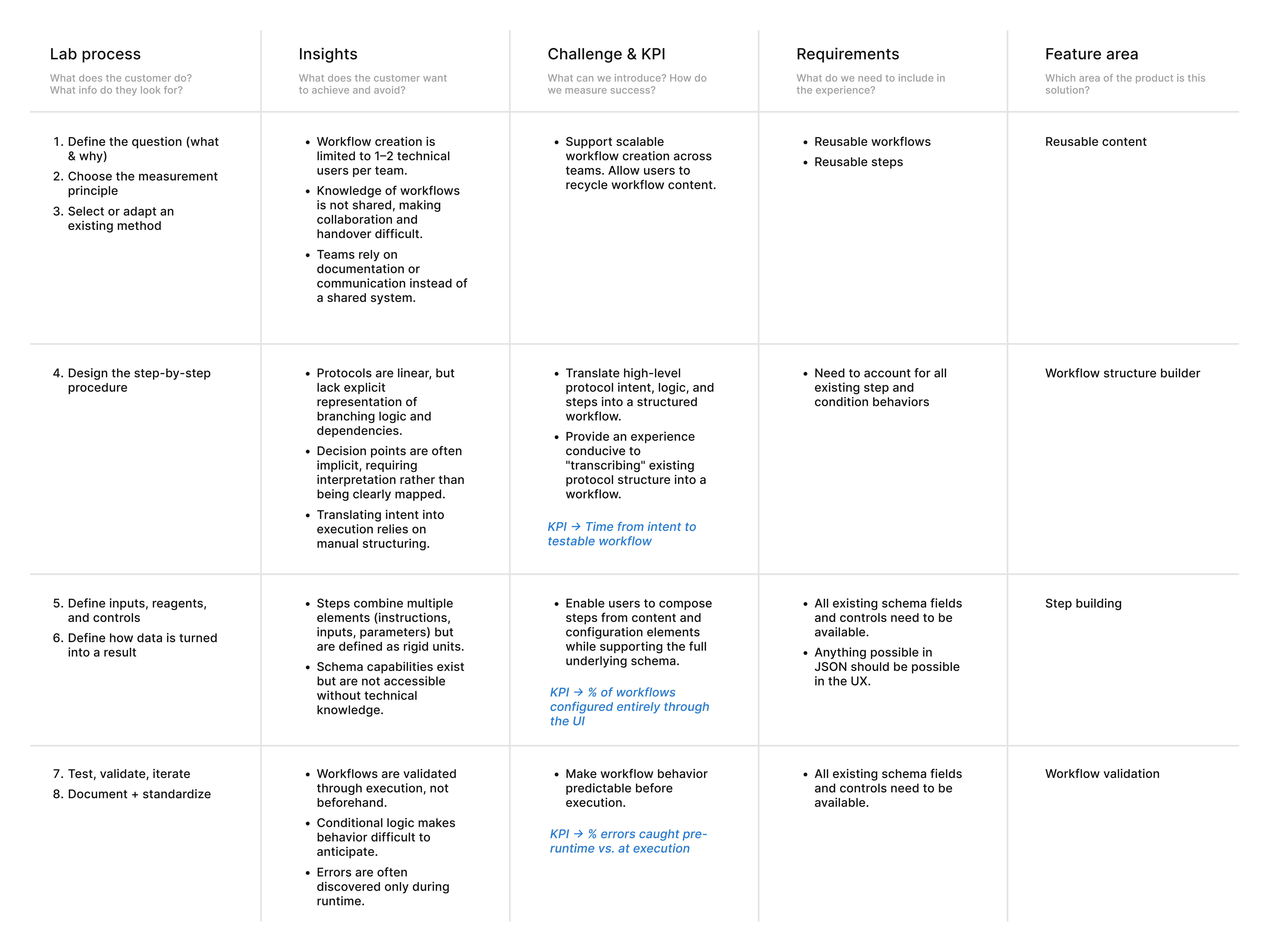
Lab protocol design process mapped to user journey
We split product work into 4 challenges across 1.5 months:
Challenge 1 / Workflow structure builder
Translate high-level protocol intent, logic, and steps into a structured workflow.
Provide an experience conducive to "transcribing" existing protocol structure into a workflow.
User insights
Protocols are linear, but lack explicit representation of branching logic and dependencies.
Decision points are often implicit, requiring interpretation rather than being clearly mapped.
Translating intent into execution relies on manual structuring.
I delineated requirements and assumptions from the insights and grabbed design inspiration from Mobbins before starting ideation.
Ideation / Potential solution directions
Annotated Protocol Editor (Start from written protocol)
Highlight steps
Tag conditions
Define dependencies inline
Builds on familiar mental model (text)
Text-heavy, logic not easily traceable
Hierarchical / Tree-Based Workflow
Steps nested under conditions
Branches shown as hierarchy
Hard to follow cross-branch relationships
Becomes complex at scale
Structured Form-Based Builder
Option A
Define goal
Select method
Add steps sequentially
Add conditions via inputs
Forces explicit structure
Logic remains hard to visualize
Non-Linear Flow Builder
Option B
Steps as nodes
Conditions as branches
Explicit connections
Externalizes both structure + logic
Matches how users reason spatially about flows
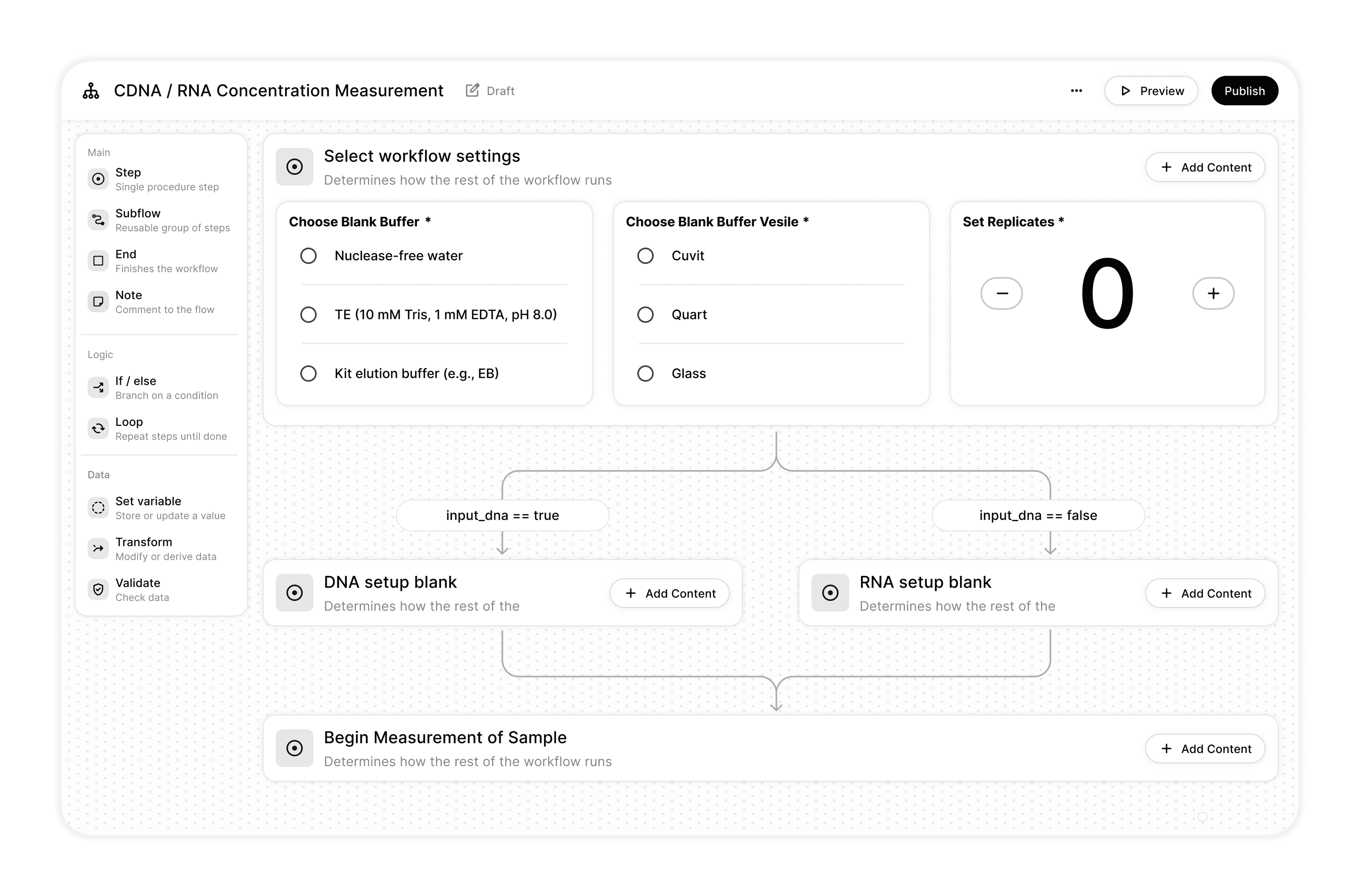
Option A
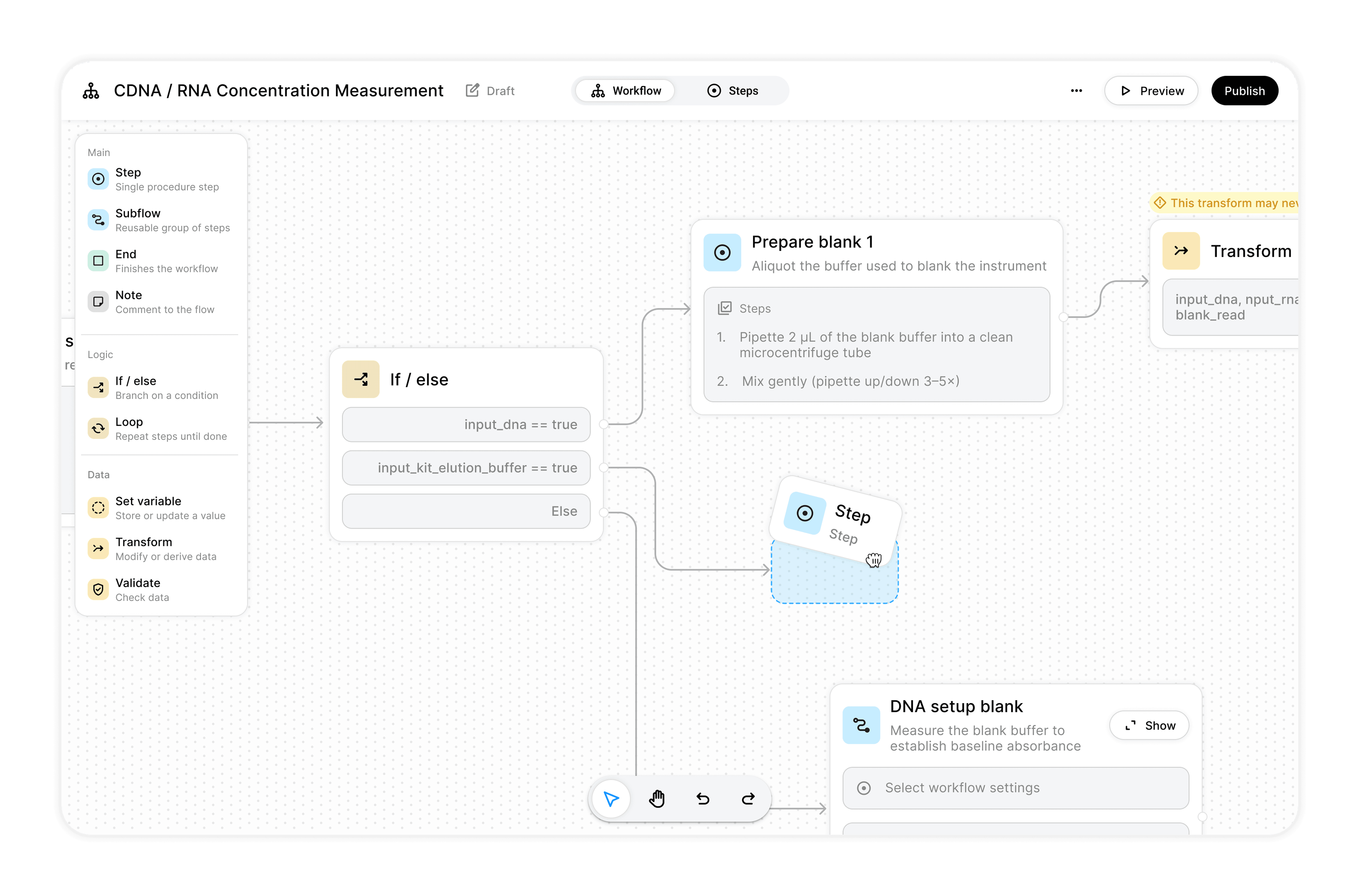
Option B
User testing
Based on 6 user testing sessions, we chose the non-linear flow builder (Option B) over the linear form editor because users were able to more accurately interpret workflow logic and branching consistently across several different protocol use cases.
Option B trade-off
We gained clearer understanding of decision paths (fewer errors when structuring flows), while sacrificing some editing efficiency by separating structure from step content.
Add step -> Configure step
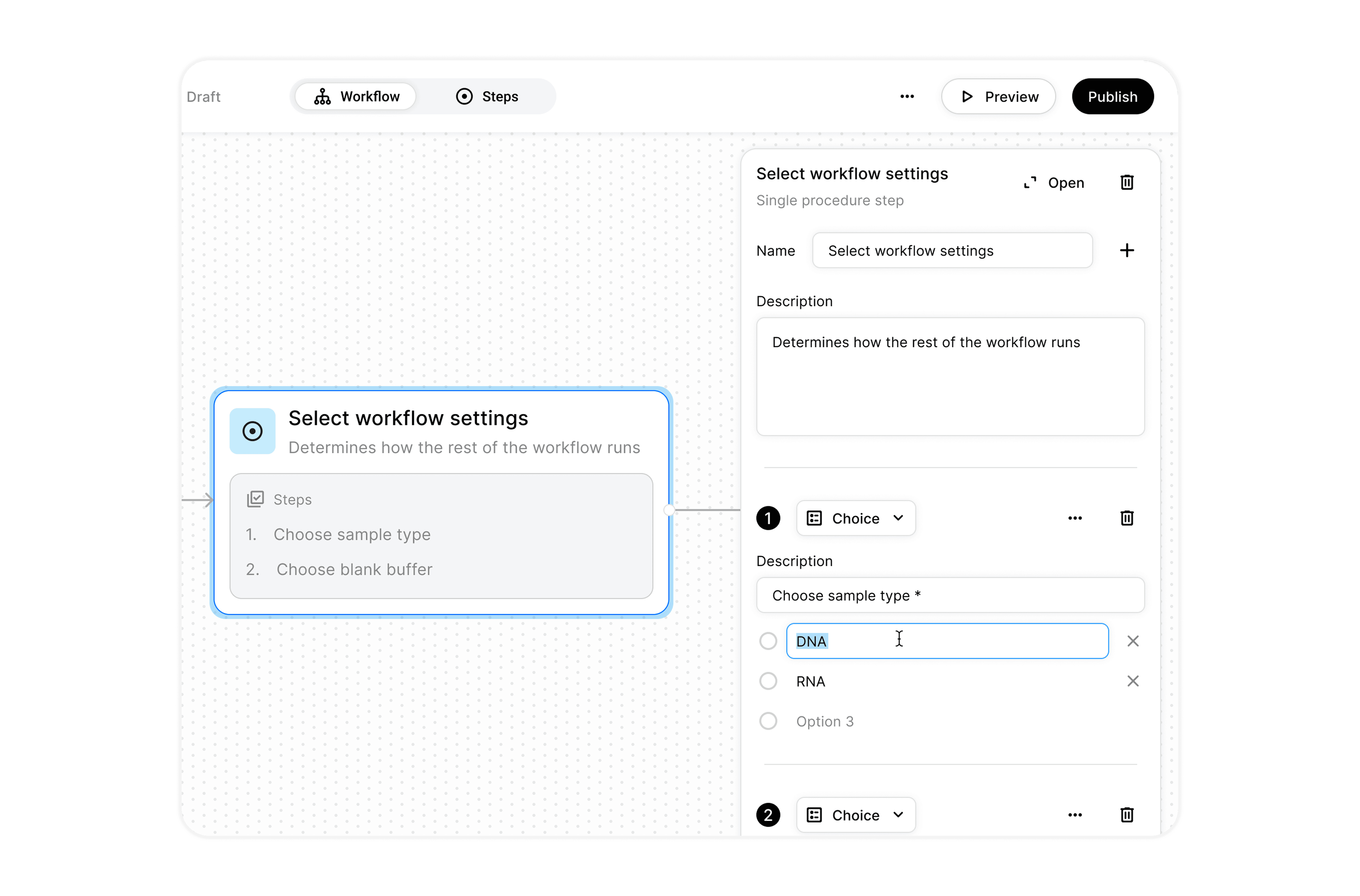
Quickly define the high level content of a step without opening the step editor
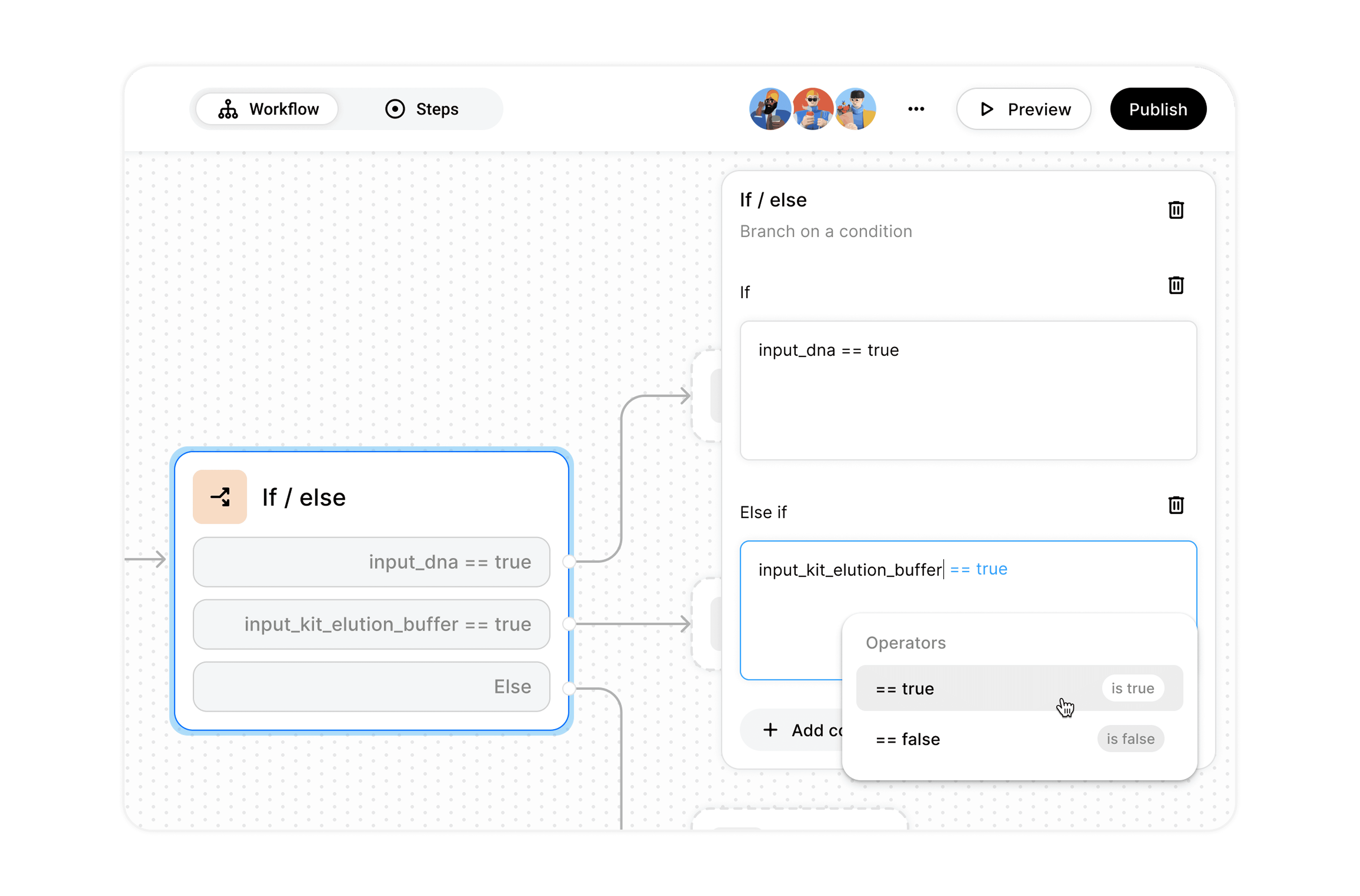
Defining conditional logic in the flow builder
Add condition -> Configure condition
Challenge 2 / Reusable content
Support scalable workflow creation across teams. Allow users to recycle workflow content.
User insights
Workflow creation is limited to 1–2 technical users per team
Knowledge of workflows is not shared, making collaboration and handover difficult
Teams rely on documentation or communication instead of a shared system
Potential solution directions
Modular Step Reuse
Highest prio
Users can reuse individual steps across workflows.
Enables reuse at a granular level
Reduces duplication and maintenance effort
Easier to scale workflows across teams
Grouped Workflow Blocks
Medium prio
Users can create and reuse groups of steps and conditions.
Supports more complex reuse patterns
[All advantages from Step Reuse]
Inline Workflow Collaboration
Low prio
Users collaborate directly on workflows through comments, annotations, and suggestions.
Addresses lack of shared knowledge
Doesn’t scale creation across teams
Adding an already-made step
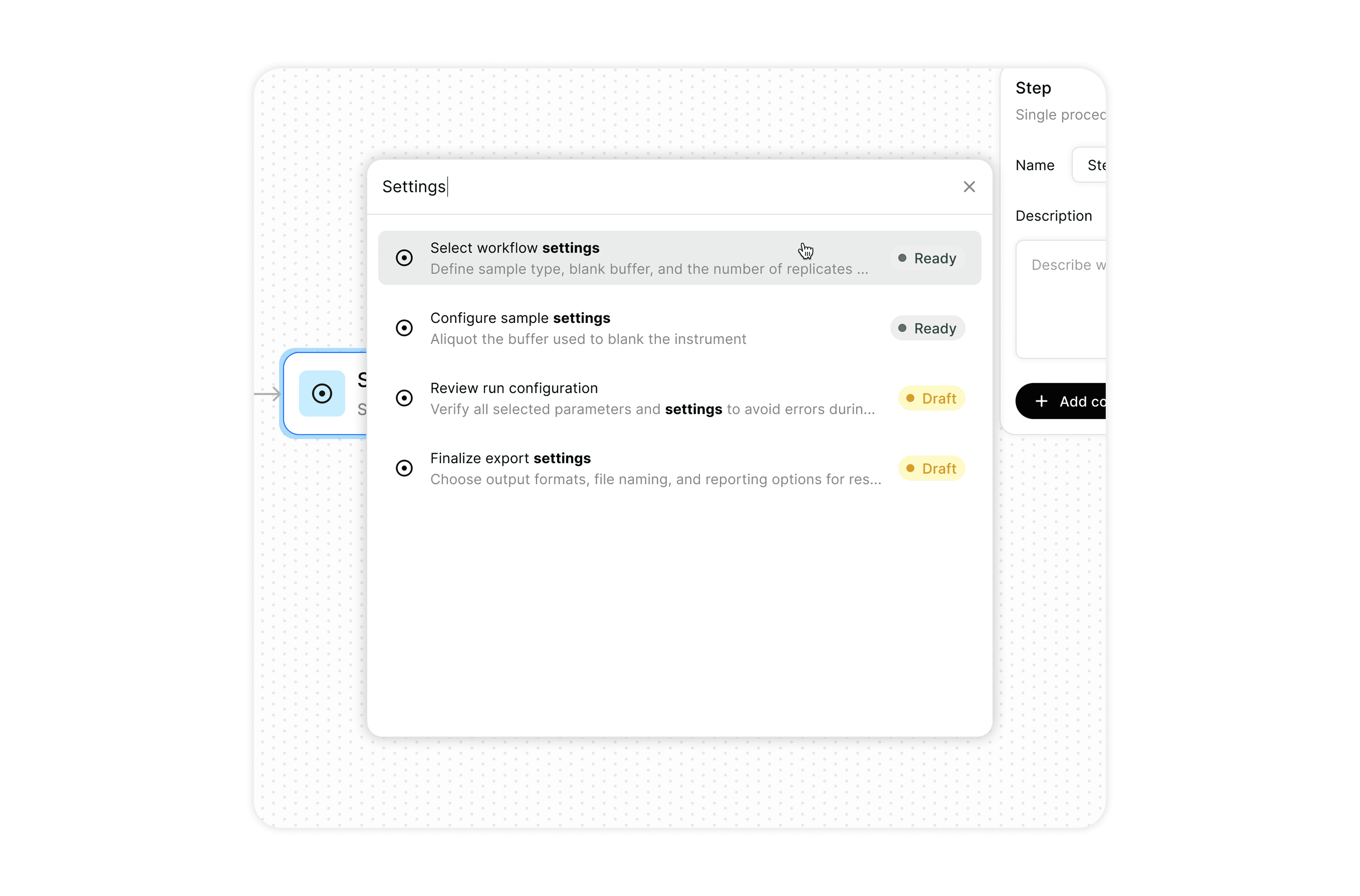
Search for and reuse saved steps / steps in other workflows
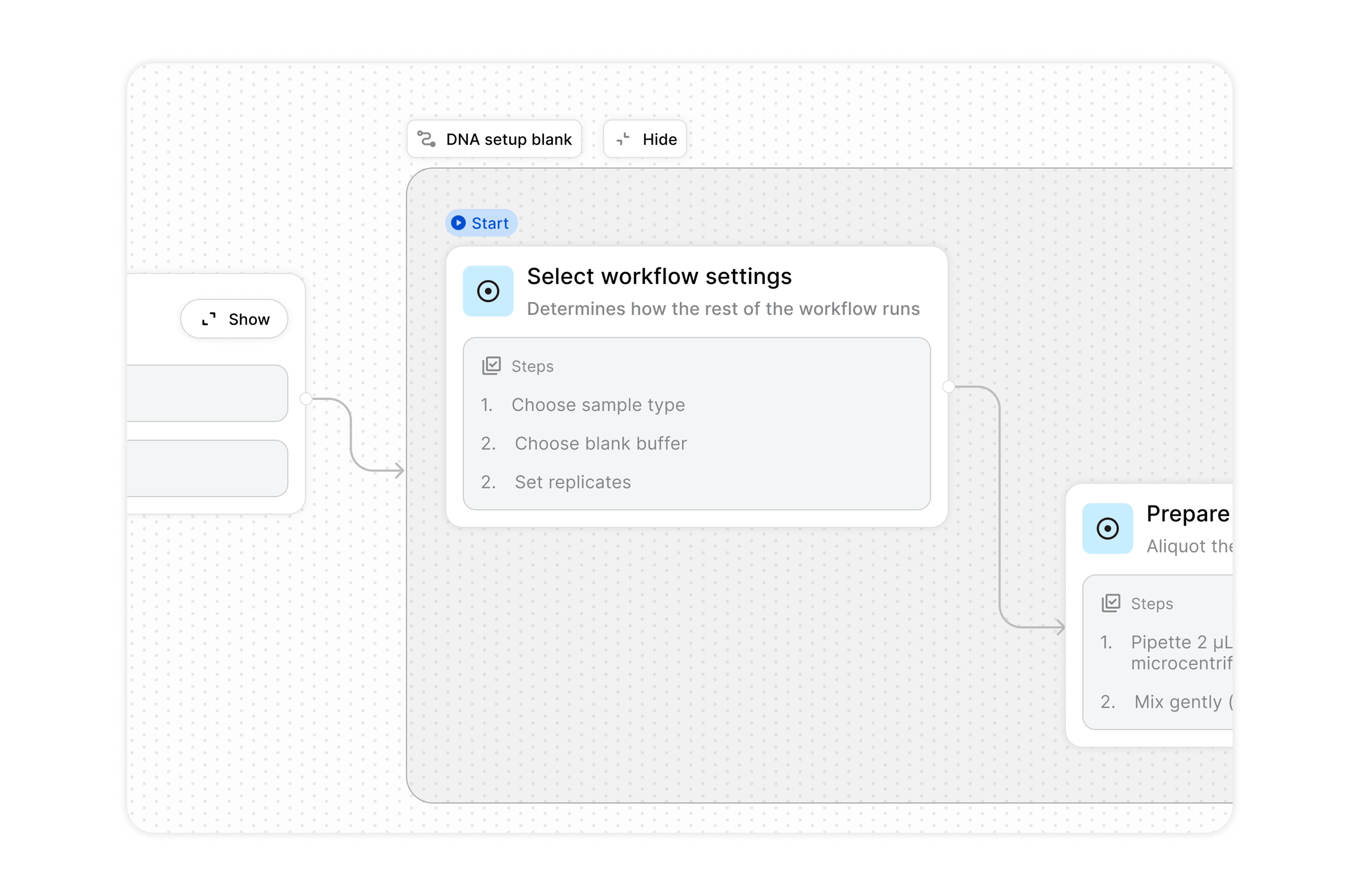
Organize steps into groups for reusability
Challenge 3 / Step building
Enable users to compose steps from content and configuration elements while supporting the full underlying schema
User Insights
Steps combine multiple elements (instructions, inputs, parameters) but are defined as rigid units
Schema capabilities exist but are not accessible without technical knowledge
Based on Laboperator's underlying workflow schema and a review of over 100 real-world lab protocols, we identified a broad set of potential step components and consolidated them into a structured set of building blocks that support the full range of workflow execution across several industries.
Step content building blocks consolidation
Instruction / Content
Text instruction
Rich text (formatted steps, warnings)
Notes / annotations
Tips / best practices
Images / diagrams
Video references
Text
Notes
Media
Inputs (User-provided data)
Text input
Numeric input
Unit-based input (e.g. µL, mg)
Date input
Time input
Boolean (yes/no)
Single choice
Multiple choice
Dropdown selection
Text
Number (with units)
Input
Counter
Choices
Single
Multiple
Dropdown
Date/time
Time based
Timer
Stopwatch
Delay / wait condition
Scheduled start
Timer
Conditional
Stopwatch
Data Capture / Output
Measurement input (manual entry)
Instrument data capture
File upload
Image capture
Result calculation
Derived values
Data visualization (charts, results, gauges from devices)
Data entry & capture
File / image upload
Calculations / transformations
Data visualization
Actions
Lab tasks (pipette, mix, incubate, measure)
Device operations
Buttons / triggers
Lab tasks
Device operations
User triggers
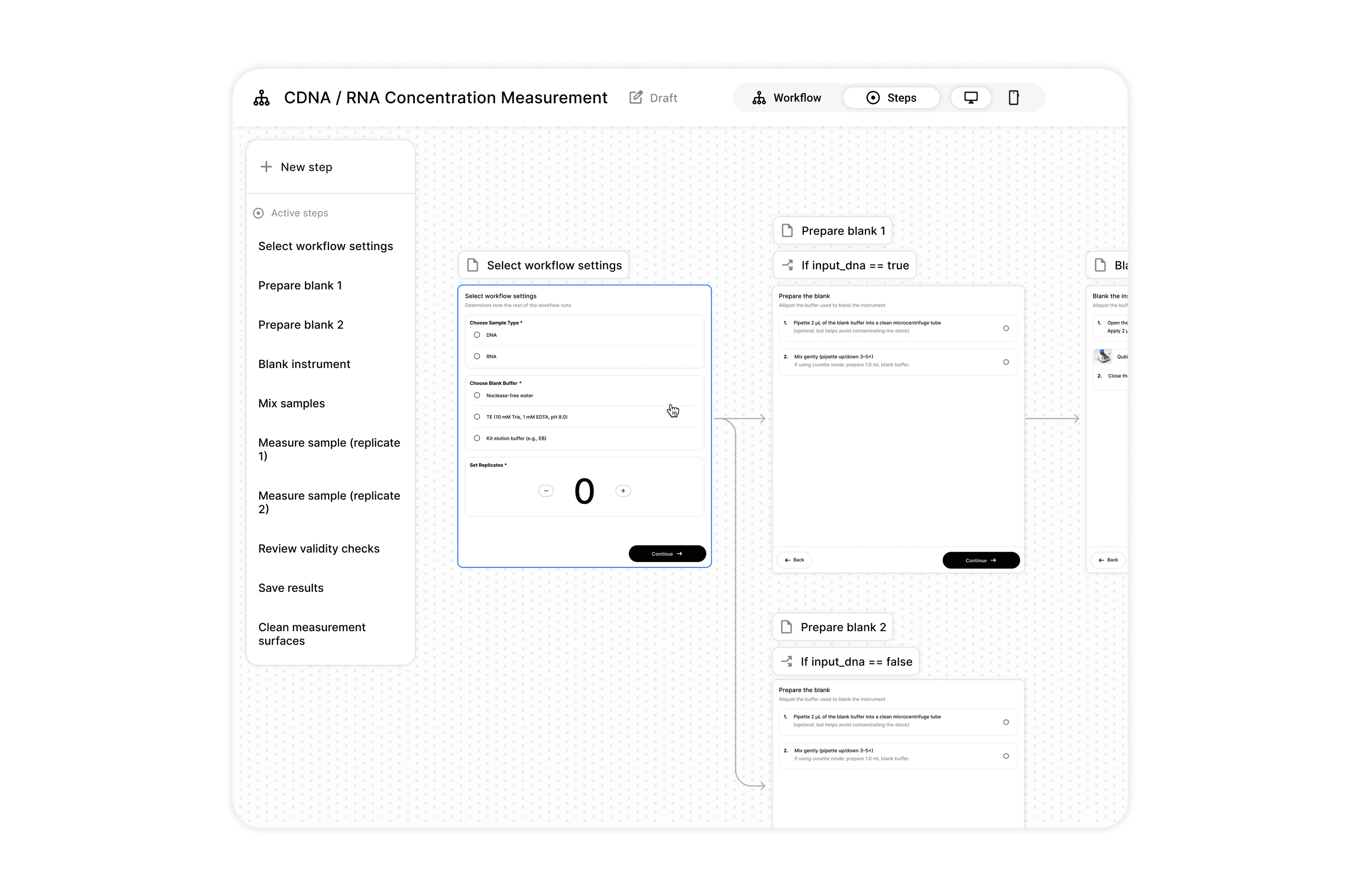
Visualize the step content and flow together to reduce cognitive load shift
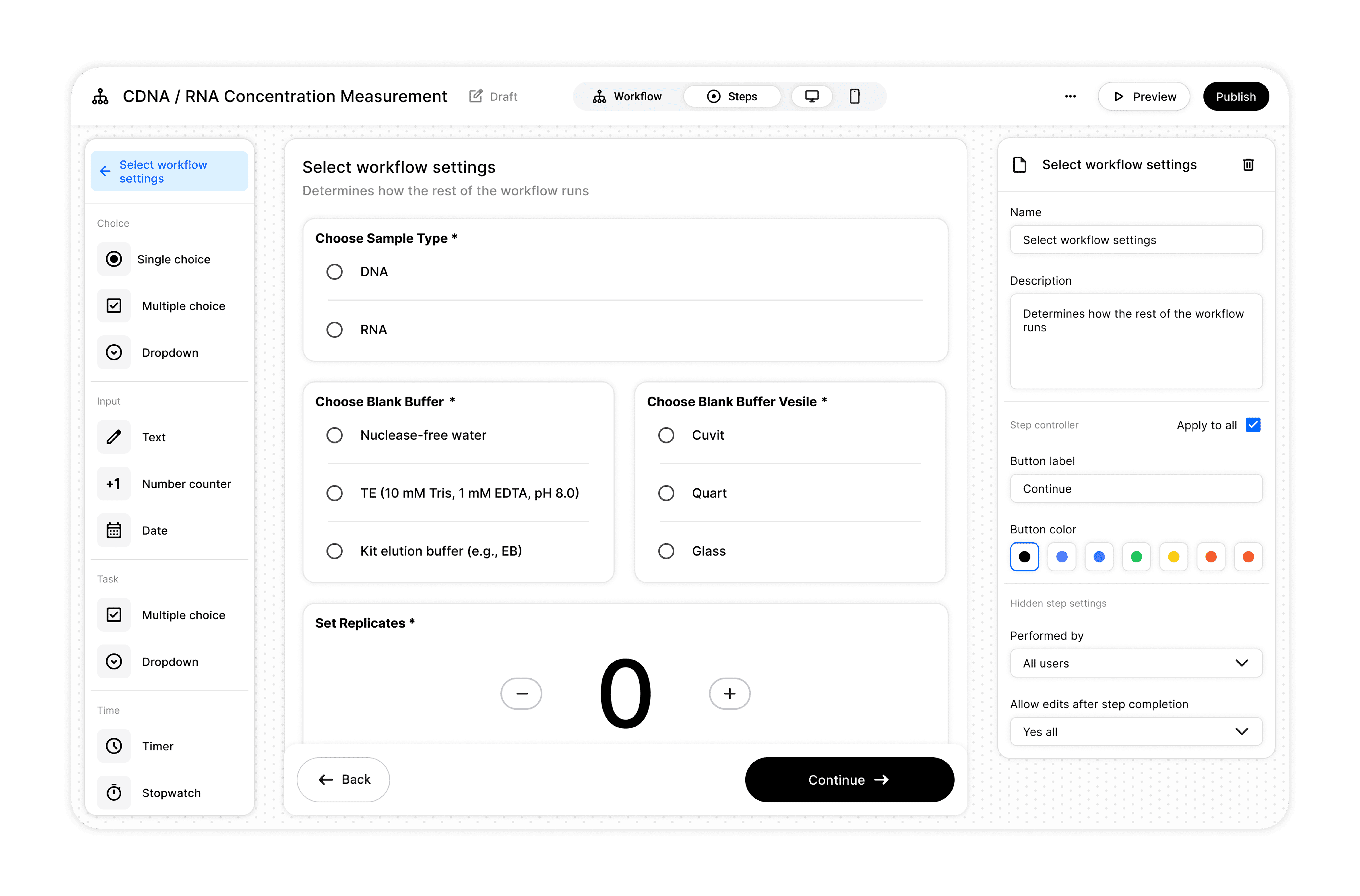
Step editor and component building blocks
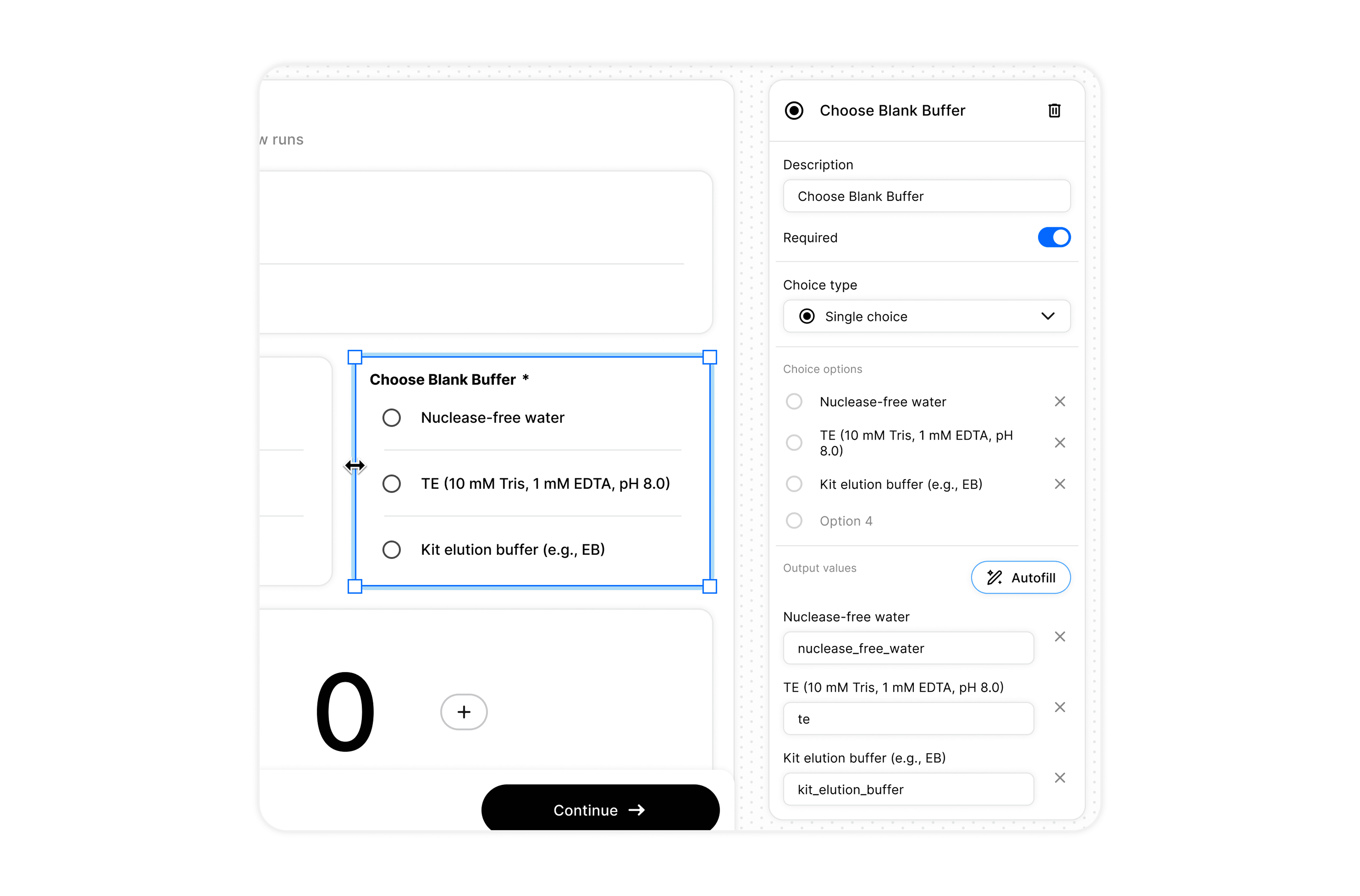
Configuring each block is accessible via the right panel
Challenge 4 / Workflow validation
Make workflow behavior predictable before execution.
User Insights
Workflows are validated through execution, not beforehand.
Conditional logic makes behavior difficult to anticipate.
Errors are often discovered only during runtime.
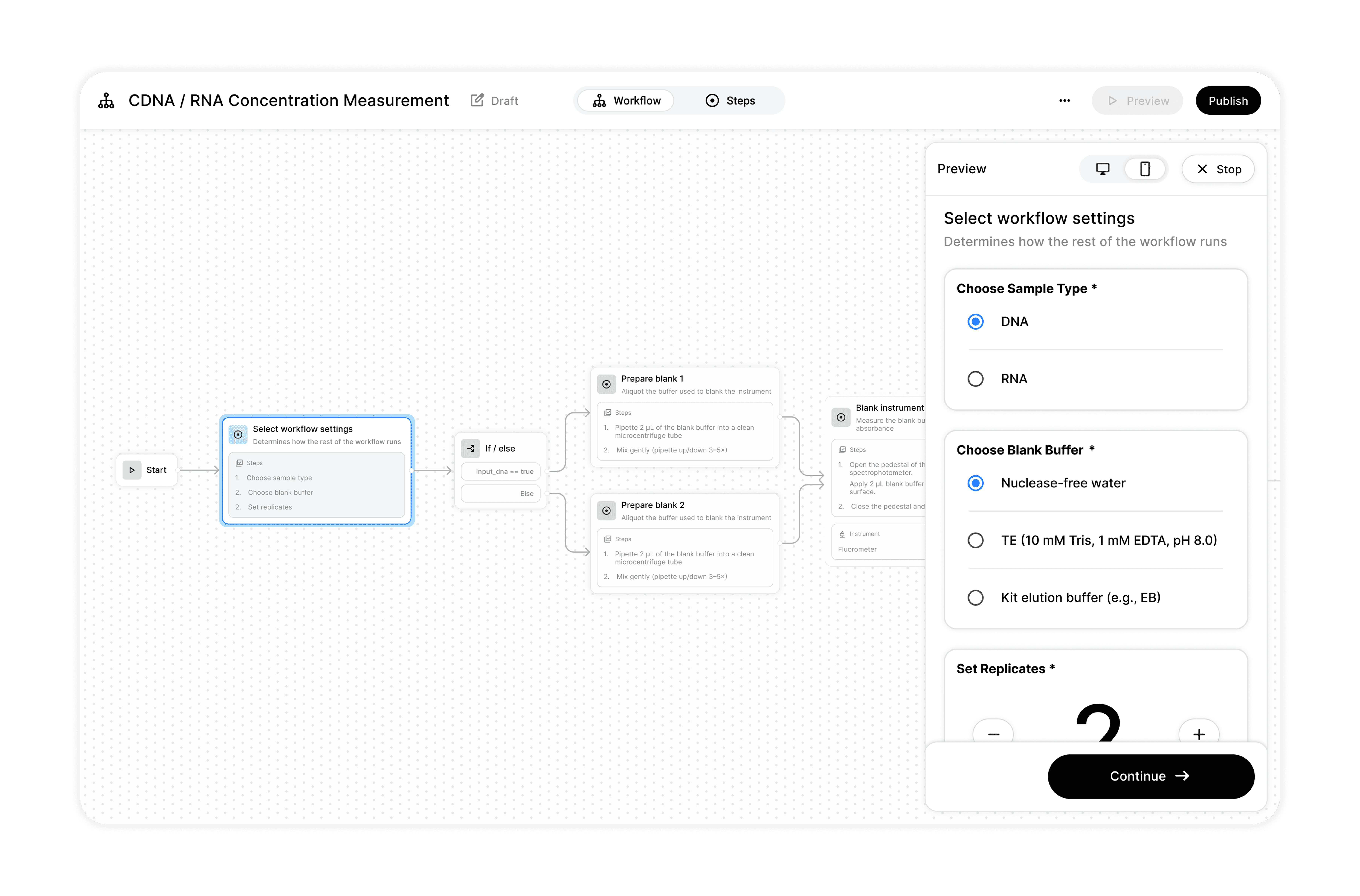
Preview the workflow, depicting how exactly it will look when executing on mobile and larger screens
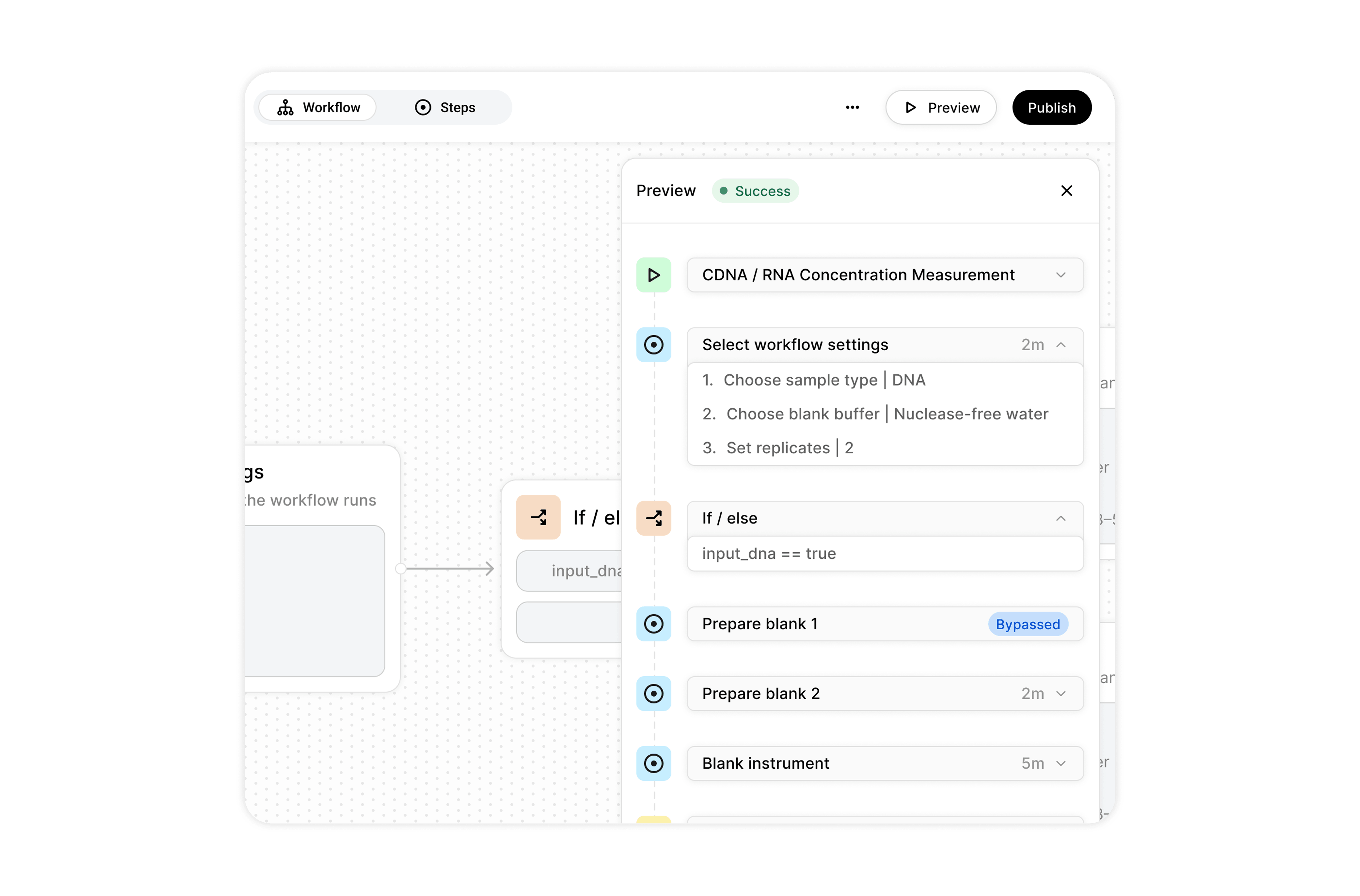
Get a status report of your workflow in a linear view
Testing as a system
Testing each challenge on its own is fine, but how does each part of the software feel together as a whole?
One area we saw user friction during testing was when using conditions. Conditions pop up in a few areas of the application.
Some of the pain points were:
Lack of guidance on how to define them.
Confusion on defining AND remembering condition parameters (values and fields).

After user testing these changes, non-technical users were able to more confidently create and use conditions without guidance.
Project results
With an MVP build and shipped, core challenges tested and validated with users, we saw great adoption metrics within initial rollout teams.
The Workflow Editor directly help us close larger customers like Bayer, Roche, and Boehringer Ingelheim, among other prospect customers, driving up ARR for Laboperator.